Creating a Genome
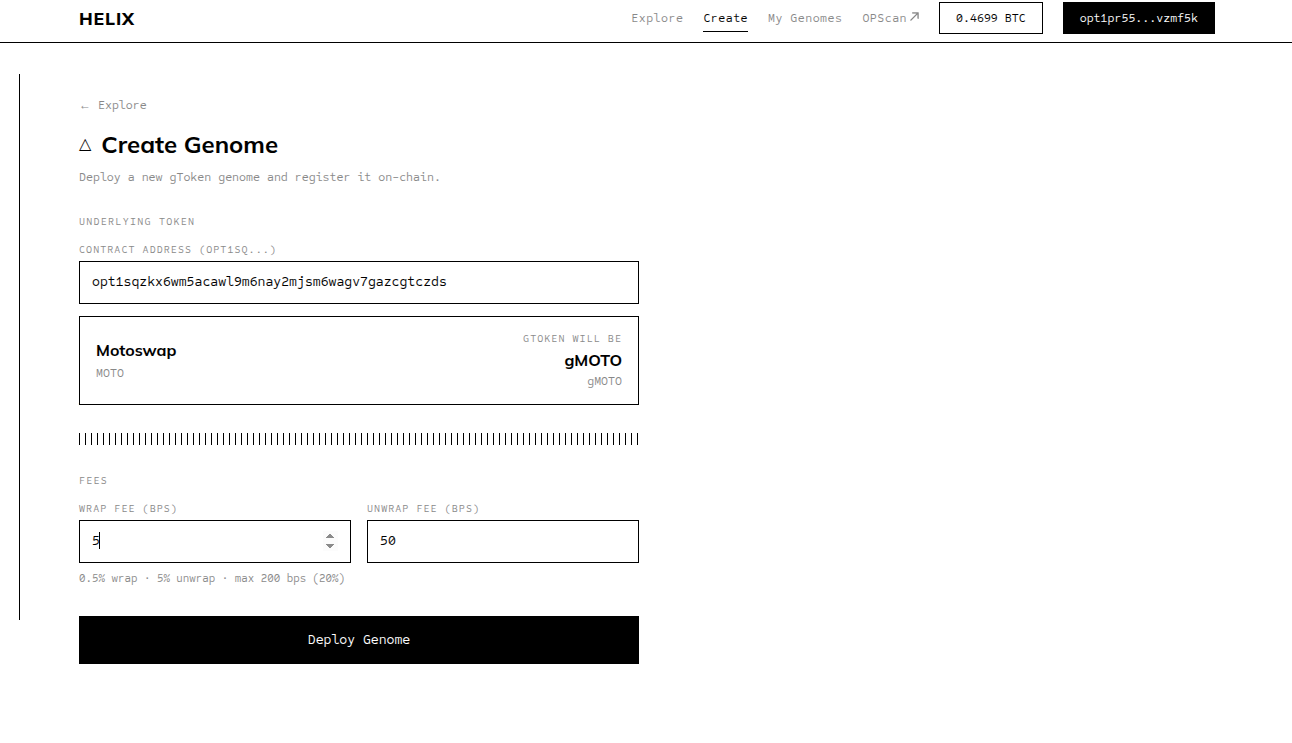
Steps
Go to
/create— Click the "Create" tab in the navigation bar. This opens the Create Genome page.Paste the underlying OP-20 token contract address — Enter the contract address of the token you want to wrap. The app will resolve the token contract and auto-fill the name and symbol.
Name and symbol auto-fill — The Genome name and symbol are derived automatically from the underlying token's ticker using the convention
g+ uppercase ticker. For example, if the underlying token isMOTO, the Genome name becomesgMOTOand the symbol becomesgMOTO. You do not need to enter these manually.Set wrap fee and unwrap fee — Choose your fee rates using the preset buttons (0%, 0.5%, 1%, 2%, 5%, 10%) or enter a custom value in basis points (0–200). You can change fees later, so starting with a common value like 1% is reasonable.
Click "Deploy Genome" — This triggers two OPWallet transactions:
- Funding transaction — Sends a small amount of BTC to fund the contract deployment
- Deployment transaction — Deploys the Genome WASM bytecode to OPNet
Confirm both transactions in OPWallet when prompted. Wait for each to be confirmed before proceeding.
Genome is registered in the Factory automatically — After deployment, the app registers your new Genome in the Helix Factory contract. This makes it discoverable on the Explore page. No separate transaction is needed for this step.
Create the MotoSwap pool — After registration, the app will prompt you to create the liquidity pool on MotoSwap. This is a separate transaction that initializes the gToken/underlying trading pair. Confirm it in OPWallet.
After Deployment
Your Genome now appears on the Explore page and in the "My Genomes" section of the nav. However, wrapping is not yet available to users — the pool has no reserves.
Your next step is to add initial liquidity. See Adding Liquidity.
Notes on Fees
Choose fees thoughtfully
Early wrappers set the expectations for your Genome. A 1% wrap fee and 1% unwrap fee is a standard starting point. If you plan to inject rewards regularly, you can start with lower fees since yield comes from injections rather than transaction fees.
You can change fees later
Fees are not locked at deployment. You can update them anytime from the "My Genomes" page. However, frequent changes can erode user trust — aim for stability after your initial setup.