Wrapping Tokens
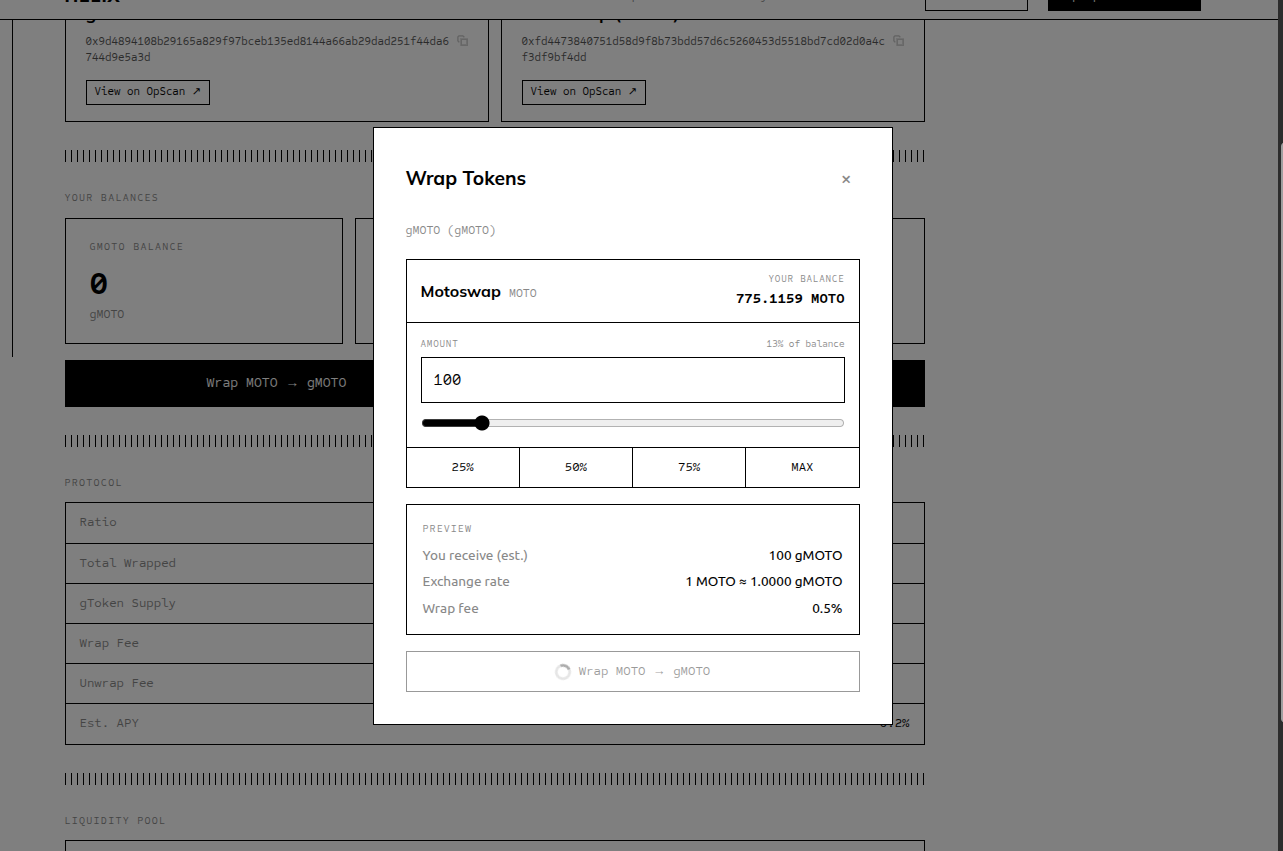
Wrapping deposits your underlying OP-20 tokens into a Genome contract and gives you gTokens in return. The gTokens accumulate yield over time as the redemption ratio increases.
Steps
Navigate to the Genome detail page — From the Explore page, click the Genome you want to use (e.g., the gMOTO Genome).
Click "Wrap → gTICKER" — The Wrap button opens the wrap modal. If the button is disabled, see the note on pool requirements below.
Enter the amount of underlying tokens to deposit — Type the amount of MOTO (or whichever underlying token) you want to wrap. You can use the "Max" button to fill your full available balance.
Review the preview — The modal shows:
- Estimated gTokens you will receive
- Current exchange rate (ratio)
- Wrap fee amount deducted
- Net underlying used for conversion
Approve the underlying token (first time only) — On your first wrap, OPWallet will prompt you to approve the Genome contract to spend your underlying tokens. This is a separate transaction. Confirm it in OPWallet and wait for it to complete.
Confirm the wrap transaction — After approval (or if already approved), OPWallet will prompt you to sign the wrap transaction. Review and confirm.
gTokens appear in your wallet — Once the transaction is confirmed on-chain, your gToken balance updates in the app. Your underlying token balance decreases by the deposited amount.
Important Notes
First wrap is at 1:1 (no fee, no ratio adjustment)
If the Genome is brand new and has no ratio growth yet, your first wrap at 0% fee gives you exactly 1 gToken per 1 underlying token.
Wrap fee is deducted before conversion
If the wrap fee is 1%, a deposit of 1000 MOTO results in 10 MOTO staying in the pool. Only 990 MOTO is used to calculate your gTokens. You will receive fewer gTokens than you deposited tokens.
Wrapping requires an active liquidity pool
Wrapping is only available after the Genome has an active MotoSwap liquidity pool with reserves on both sides. If no pool exists yet, the Wrap button will be disabled and the detail page will show a notice. This protects against price manipulation before a pool is established.